A fair question hangs over every bookmark collection now: if a search engine or an AI assistant can re-find almost anything in seconds, why keep a personal library at all? It sounds like the pile of saved links finally has an excuse to be deleted.
But re-finding a page was never the hard part of research. The hard part is remembering that a source existed, why it mattered to your question, and which project it was going to serve — and no search engine holds that, because it lives in your head at the moment you save and evaporates about a week later. A bookmark collection is not a cache of the web. It is a record of your judgment: hundreds of small decisions that this mattered. That judgment is the raw material of research, and it is the one thing you cannot ask anyone — or anything — to regenerate for you.
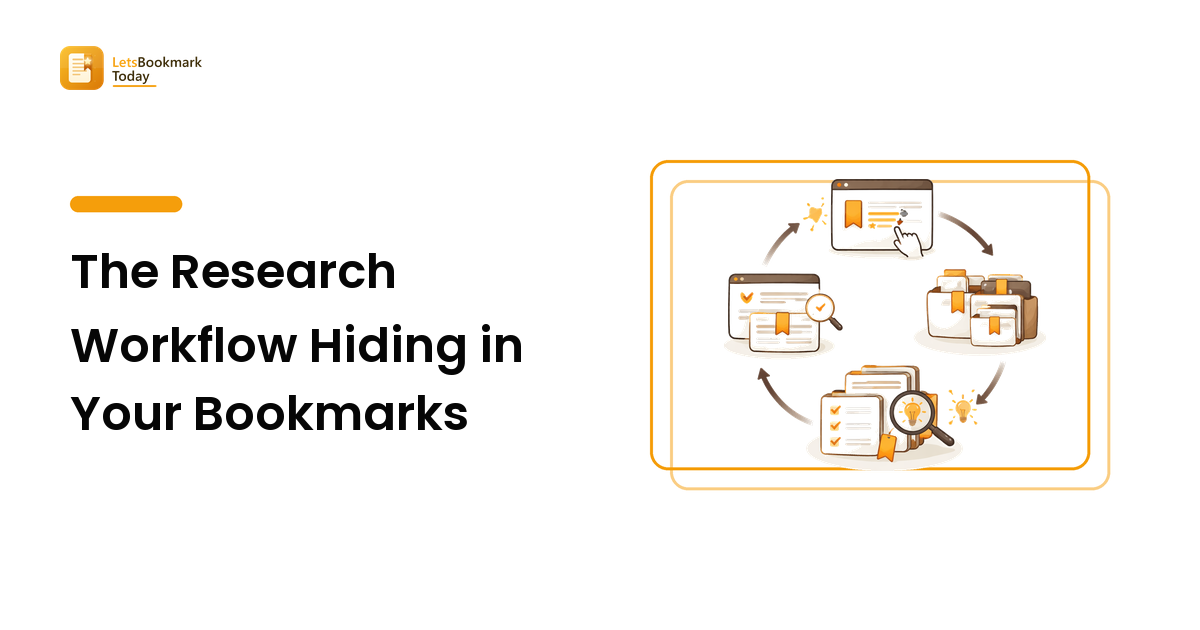
The catch is that judgment stored as a bare URL decays into a pile. Getting research value out of what you save takes a loop with four stages — capture, retrieval, resurfacing, and synthesis — and the pile wins whenever one of the four is missing. This guide is the map of that loop: what each stage has to do, where it usually breaks, and where we've covered the mechanics in depth.
The loop: four stages between "saved" and "used"
Think of every saved link as a small loan you make to a future project. The loan only pays off if it travels the whole route:
- Capture — the source enters your library carrying enough of your own words to survive.
- Retrieval — you can pull it back out when a project asks a question.
- Resurfacing — the library pushes things back at you, because you won't always know what to ask for.
- Synthesis — the source stops being a link and becomes a note, an argument, a paragraph of your own.
Most collections have stage 1 in abundance and nothing else. That's not a character flaw — saving takes two seconds and every later stage takes deliberate effort. But it explains the familiar shape of the problem: a thousand saved links, and a blank page when the actual work starts.
Stage 1: Capture with intent, not just enthusiasm
The saving habit itself is rarely the problem; saving usefully is. A bare URL preserves the page but loses the reason — and the reason is what you'll search for later. The fix is small: at the moment of saving, add a few words in your own vocabulary about why it matters and what it's for. Two seconds of typing at capture buys back whole afternoons at retrieval time.
What that looks like in practice — deciding the why, the question it answers, and the project it belongs to — is the subject of building a research library, which turns this stage into a repeatable habit. And if your tags have drifted into seven spellings of the same idea, the controlled-vocabulary method in organizing and tagging bookmarks is the repair.
One newer wrinkle belongs in the capture stage: sources that aren't pages. If part of your thinking now happens in AI chats, those conversations are research material too, and they are even easier to lose than tabs — saving AI chat conversations covers how to bring them into the same library instead of a separate graveyard.
Stage 2: Retrieval — the stage your tools quietly sabotage
Retrieval fails for a mechanical reason, not a memory one: you remember what was inside an article, while most tools index only its title and URL. The words in your head and the words in the index don't overlap, so the search comes back empty and the source might as well not exist.
Knowing what your tool actually indexes — and feeding it words you'll genuinely type later — is the difference between a library and a locked room. The failure modes and the fixes are walked through in searching your saved bookmarks. For the pillar-level point, one sentence is enough: a source you cannot retrieve on the day the project needs it has the same value as one you never saved.
Stage 3: Resurfacing — because you won't know what to ask for
Search only finds what you think to look for. But some of the best research moments are collisions you didn't plan: the piece you saved in March that suddenly explains the problem you hit in September. That takes the library pushing content back at you — a small, scheduled habit of re-encountering your own saves.
This is the stage almost everyone skips, because saving already feels like progress and the brain files the job as done. Why that misfire happens and how to build a resurfacing routine that survives contact with a busy week is covered in why you never revisit saved bookmarks. At the map level, the principle is: retrieval serves the questions you have; resurfacing supplies the questions you didn't know to ask.
Stage 4: Synthesis — where links become work
Here is the stage no app automates and no spoke of the loop can skip: at some point a source has to leave the library and enter your own words. Until then, you haven't done research — you've done logistics.
Synthesis doesn't need a grand system. It needs a small promotion ritual:
- Read with a destination. When a project is live, read your retrieved and resurfaced sources against a question, not as a queue to clear. A source either answers the question, complicates it, or gets returned to the shelf.
- Write the note in your own sentences. One to three sentences per source: what it claims, and what you make of it. Copy-pasting a highlight preserves the author's thinking; the note is where yours starts. Keep the link attached so the source is one click away when you need to verify or quote.
- Group notes by argument, not by source. The moment two notes from different sources sit under the same claim, you have the beginning of an outline — and the library has done its actual job.
- Feed the conclusion back. When the project ships, the handful of sources that carried it deserve a tag or a note saying so. Your future self learns which kinds of saves turn into work, and your capture instinct sharpens.
Where those notes live — the bookmark manager's note field, a notes app, a plain document per project — matters far less than the habit. Choose the tool you'll open anyway; the workflow survives tool changes, which is precisely why it's worth learning as a workflow and not as an app.
Where the loop breaks, and how to tell which stage is yours
The pile always looks the same from the outside, but the break is usually in one specific stage. A quick diagnosis:
- You save constantly but searches come back empty → a capture problem. Your saves carry no words of yours. Start describing, per the research library method.
- The material is described but you can't find it under pressure → a retrieval problem. Learn what your tool indexes in the search guide.
- You can find things but never think to look → a resurfacing problem. Build the revisiting habit.
- You re-read good sources and still produce nothing → a synthesis problem. Add the promotion ritual above: question, note, argument, outline.
Fix the broken stage, not the whole system. A working loop with modest tools beats a perfect toolchain wrapped around a missing stage.
FAQ
Are bookmarks enough for serious research, or do I need a reference manager? Bookmarks carry you further than most people expect — through the collecting, retrieving, and note-making stages. A dedicated reference manager earns its place when you need formal citations, PDFs of papers, or shared libraries with collaborators. The loop is the same in both; the tool changes at the citation stage, not before.
Should notes live in my bookmark manager or in a notes app? Wherever you will actually reopen them. The note field next to the bookmark is the lowest-friction option and keeps source and note together; a notes app wins when notes need to combine across sources into outlines. Many workable setups do both: a one-line note at capture, promoted into the notes app when a project goes live.
Does AI make a personal research library obsolete? It makes one stage easier — re-finding public material — and leaves the others untouched. An assistant can't know which of ten thousand pages you judged worth keeping, what question you saved it against, or which project it was for. That context is the library's real content, and you are the only one who can record it.
How is a research library different from a reading queue? A queue is for consuming: items enter, get read, and leave. A library is for keeping: items enter because they'll be needed again and are described so they can be found. Mixing the two is why collections bloat — triage at save time by asking whether you're saving to read it once or to use it later.
Saved links become research the day the loop closes: capture something with your reason attached, trust that you can retrieve it, let the library resurface what you forgot, and promote the best of it into notes that carry your projects. Start with whichever stage is broken for you — and if you want the whole system in one place, Lets Bookmark Today is built around exactly this loop.